

Building OpenAct apps
OpenAct is a core plus apps. The core gives every app sign-in, people, companies, roles, live updates, email, files and the web shell. An app adds the features. Project management is the first app, and it is installed by default.
How it fits together
packages/core      @openact/core   Sign-in, sessions, companies, roles, live rooms, email, the app system
packages/ui        @openact/ui     The web shell, the side panel, sign-in, company settings, shadcn/ui components
apps/projects      @openact/app-projects   Projects, tasks, board, timeline, calendar, AI agent, task search
apps/<your-app>    Your app
src/               The host: the Worker entry, the web app entry, and this deploy's own pages
openact.apps.json  The installed apps, in order, and the primary app
.openact/          Files that `npm run sync` writes from openact.apps.json. Do not edit them.
Cloudflare Workers cannot load new code while they run. So apps are added when you build: npm run sync writes a list of the installed apps into .openact/, and the build includes them.
Add an app
npm run openact -- add contacts                   # an app from the app directory, by its id
npm run openact -- add github:owner/repo          # the default branch
npm run openact -- add github:owner/repo#v1.2.0   # a tag or branch
npm install
npm run deploy                                     # or: npm run dev
add copies the app into apps/<id>, the way shadcn/ui copies components: the code is in your repository, and you can read and change it. It adds the app to openact.apps.json and copies its migrations into .openact/migrations/. The deploy applies them.
Private repositories work when git on your computer can sign in to GitHub.
| Command | What it does |
|---|---|
npm run openact -- list | Shows the installed apps and where they came from |
npm run openact -- directory | Shows the apps in the app directory |
npm run openact -- update <id> | Copies the app again from GitHub. It replaces apps/<id>, so keep your own changes in git. |
npm run openact -- remove <id> | Removes the app. Its tables stay in the database, so you can add it again without data loss. |
npm run sync | Writes .openact/ again. The build, dev and migrate scripts run it for you. |
Make an app
An app is a folder with a package.json that has an openact field:
{
  "name": "@acme/openact-app-inventory",
  "type": "module",
  "openact": {
    "id": "inventory",
    "name": "Inventory",
    "server": "./src/server/index.ts",
    "client": "./src/client/index.tsx",
    "migrations": "./migrations",
    "durableObjects": [],
    "enabledByDefault": true
  },
  "dependencies": { "@openact/core": "^0.2.0", "@openact/ui": "^0.2.0", "hono": "^4.13.16", "react": "^19.3.1" }
}
The id is 2 to 31 lowercase letters, numbers or dashes. It must be unique in a deploy. Some ids are reserved for official apps and for OpenAct itself. For a common name, use a longer id, such as acme-tasks.
enabledByDefault is optional. Set it to false when each company must turn the app on first.
plan is optional, and only official MarketGrowth apps use it. Set it to "director" or "producer" to make a paid app. The core locks the app in companies without that plan. See Plans.
requiresApps is optional. List the apps that must be installed too, such as ["projects"]. npm run sync stops with a clear message when one is missing. optionalApps lists apps that your app uses when they are there.
Use another app
An app can call another app's server code only through that app's public entry. The Projects app has one: @openact/app-projects/api. It makes a project for your app, for example an engagement project. List "projects" in requiresApps and in your dependencies.
import { createProject } from "@openact/app-projects/api";

const { id, path } = await createProject(env, {
  companyId,
  name: "Acme Inc: Growth retainer",
  visibility: "secret",
  ownerId: advisorUserId,
  members: [{ userId: clientUserId, role: "editor" }]
});
createProject does not check the caller's access. Check your own permission first. A member who is not in the company joins it as a guest. Advisory uses it.
Server side
// src/server/index.ts
import { Hono } from "hono";
import { defineServerApp, requirePermission, requireUser, type AppEnv } from "@openact/core/server";

const routes = new Hono<AppEnv>();
routes.get("/companies/:id/items", async (c) => {
  const user = requireUser(c);
  await requirePermission(c.env, c.req.param("id"), user.id, "inventory.view");
  const rows = await c.env.DB.prepare("SELECT * FROM inventory_items WHERE company_id = ?").bind(c.req.param("id")).all();
  return c.json({ items: rows.results });
});

export default defineServerApp({
  id: "inventory",
  name: "Inventory",
  permissions: {
    "inventory.view": { label: "See inventory", roles: ["owner", "admin", "member"] },
    "inventory.edit": { label: "Edit items", roles: ["owner", "admin"] }
  },
  routes: (api) => api.route("/api/apps/inventory", routes),
  hooks: {
    companyMemberRemoved: async (env, companyId, userId) => {
      await env.DB.prepare("UPDATE inventory_items SET assigned_to = NULL WHERE company_id = ? AND assigned_to = ?").bind(companyId, userId).run();
    }
  }
});| Part | What it is for |
|---|---|
permissions | What people can do in your app, by company role. See Permissions. |
routes | Your API. Use /api/apps/<id>/.... The projects app keeps its older paths. |
middleware | Runs on every API request after the session is read |
scheduled | Runs on each cron trigger |
hooks.allowSignup | Lets an email sign up when sign-up is limited, for example because of your app's invitation |
hooks.signedIn | Runs after each sign-in, for example to accept your app's invitations |
hooks.companyMemberRemoved | Remove the person's access to your data in that company |
hooks.companyDeleting | Delete your data and files for that company |
hooks.companyCreated | Set up a new company |
hooks.companyDetail, hooks.companyUpdate | Read and save your app's company settings through /api/companies/:id |
Permissions
Declare what people can do in your app in permissions, and check it with requirePermission() in every route. The core stores each company's choices, and Company settings shows them. Read Permissions for the full guide.
Apps that a super admin turns off in Site settings are off in every company. requirePermission, requireAppOn and companyAppState already count that switch. Routes outside /api/, such as a public link, must call loadSite(env) first, because only /api/ routes load the site settings for you.
Live updates: call registerRoomKind("inventory-item", readRevisions) once, markChanged("inventory-item", id) when data changes, and acceptLive() in a route that checks access first. Pages use useLive() from @openact/ui.
Client side
// src/client/index.tsx
import { lazy } from "react";
import { defineClientApp } from "@openact/ui";

const InventoryPage = lazy(() => import("./InventoryPage"));

export default defineClientApp({
  id: "inventory",
  name: "Inventory",
  icon: "box",
  routes: [{ pattern: /^\/a\/inventory\/?$/, render: () => <InventoryPage /> }]
});
The app rail and the app panel
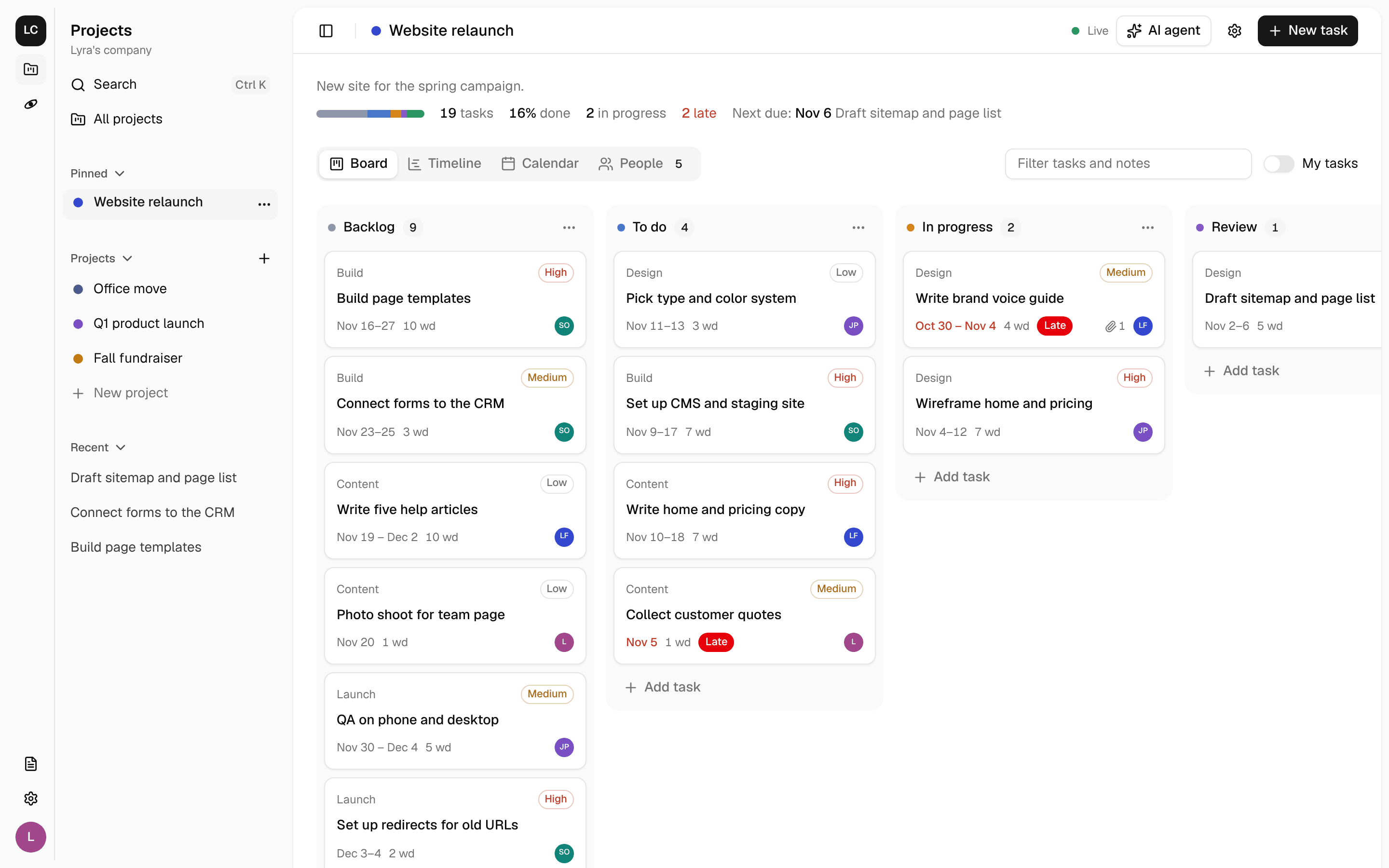
The side panel has two columns, like a desktop chat app:
- The app rail on the left. It shows the company, one icon for each app, the App directory, the footer items, Company settings and the person's menu. Projects is first, because it is installed first.
- The app panel beside it. It shows the active app's name, its commands, its
navitems and itsSidebarSection. The projects app shows Pinned, Projects and Recent here.
Ctrl+B or Cmd+B collapses the panel and leaves only the rail. On a phone, both columns open as one sheet.
The primary app
A deploy can have one primary app. Use it for the app that the deploy is for, such as a company's own app. The primary app goes at the top of the rail, above a divider. The other apps go below it, in install order. Another divider separates them from the App directory.
| Primary app | The rail, from the top |
|---|---|
| None | Projects, Docs, divider, App directory |
gtmmatters | GTM Matters, divider, Projects, Docs, divider, App directory |
Set it with the app tool. The command writes "primary" in openact.apps.json:
npm run openact -- primary gtmmatters
npm run deploy
Run npm run openact -- primary none to remove it. npm run sync fails when "primary" names an app that is not installed or that has no web code. The rail shows the primary app only when it has an icon or a Mark and the company has it on. If not, the rail shows the other apps as if there is no primary app. On the Apps page, the primary app is first and has a Primary badge.
The primary app does not change which app owns /. The first app with a home page still owns it.
An app shows in the rail when it has an icon or a Mark. Its pages live under /a/<id>/ by default, and the rail lights the app that owns the current page. See examples/orbytt for a second app with its own icon, panel and pages.
| Part | What it is for |
|---|---|
icon | The app's icon in the rail, as a Lucide name for Icon, such as "users" |
Mark | A custom rail icon, such as a brand mark. Draw it with currentColor. |
home | Where the rail icon goes. Default: / for the first app with a home page, otherwise /a/<id> |
ownsPath | Says which paths belong to the app. Default: the home, /a/<id>/... and the app's routes |
routes | Pages. Start each one with SiteHeader and put its content in PageBody. |
Home | The page at /. The first app with a home page owns it. |
nav | Items at the top of the app's panel (main), or icons at the bottom of the rail for every app (footer) |
SidebarSection | Groups in the app's panel, such as Pinned, Projects and Recent |
commands | Dialogs that open from the app's panel (inSidebar), a shortcut such as Ctrl+K, or useShell().runCommand(id) |
companySettingsTabs | Tabs in Company settings |
Provider | State for your app around the whole shell |
publicRoutes | Pages that work without sign-in |
Use useShell() for the person and the config, useWorkspace() for the current company, and the shadcn/ui components at @openact/ui/components/<name>. Load pages with lazy(), so new apps do not slow the first page.
Migrations
Put numbered SQL files in migrations/, such as 0001_init.sql. npm run sync copies them as <id>_0001_init.sql. Wrangler applies new files in name order, after the core's files. Your tables may use core tables, such as users and companies. Core tables never use yours.
Rules for apps
- Prefix everything with your id. Tables (
inventory_items), routes (/api/apps/inventory), R2 keys (inventory/...), room kinds and command ids. The projects app made some tables before apps had prefixes:projects,project_members,tasks,attachments,board_columns,invitations,agent_actions,access_requestsandvector_outbox. Never use these names. - Scope your data to a company. Every row has a
company_id. Check access withrequirePermission, or your own item check built on it. - Use the core for people. Never read or write
users,sessions,companiesorcompany_membersdirectly, except for read-only joins. Never handle sign-in yourself. - Follow the UI rules in AGENTS.md: shadcn/ui components, Tailwind token classes, Lucide icons,
SiteHeaderandPageBody. - Clean up through hooks. When a person leaves a company, or a company is deleted, your hooks remove their access and data.